

This project is an ongoing journey — learning AI open source projects with steady, daily progress. Through hands-on work with real projects and AI tooling, the goal is to develop the ability to solve complex problems and document the process. Notion List
Basic Information:
- Project Name: LangGraph
- GitHub URL: langchain-ai/langgraph
- Main Tech Stack: Python, JavaScript/TypeScript, LangChain, LangSmith, checkpoint stores, LLM providers
1. What LangGraph Actually Solves
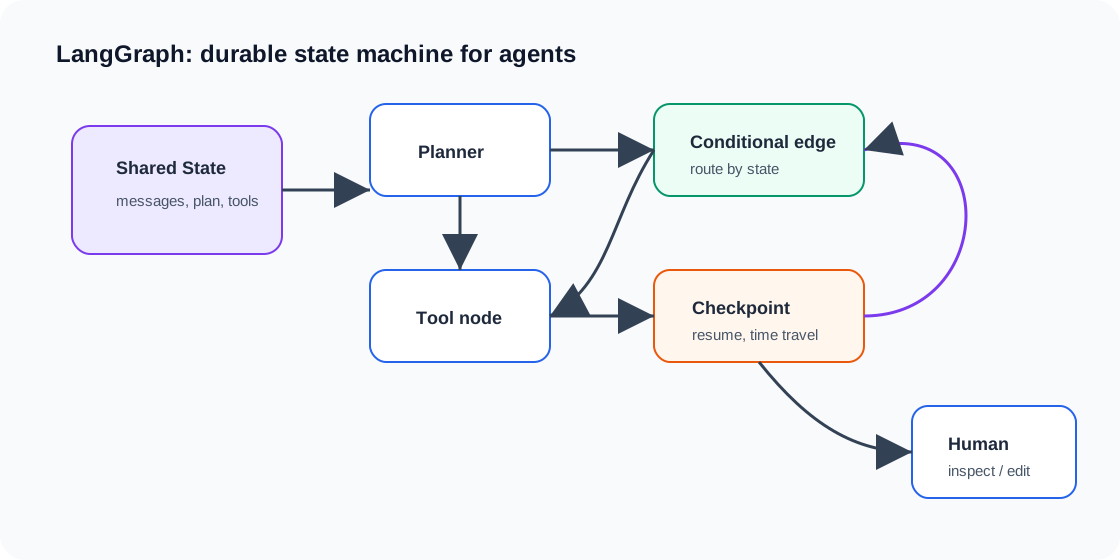
LangGraph is the low-level orchestration framework and runtime in the LangChain ecosystem. It is useful when an agent must retain typed state, branch or loop, pause for a person, survive a process failure, or expose each transition to tracing and tests. You can use LangGraph without using LangChain’s model abstractions.
Its core idea is unromantic and therefore valuable: model the application as a graph. Nodes perform work, edges choose what runs next, and shared state carries only what later steps need. The graph does not make a model wiser. It makes the surrounding system easier to inspect and recover.
2. Choose the Layer Before Choosing LangGraph
As of July 2026, the official stack has four distinct entry points. They overlap, but they are not interchangeable:
| Layer | Start here when | What you own |
|---|---|---|
| Direct model API | One call, structured output, or a small tool loop is enough | The loop, messages, retries, and persistence |
LangChain create_agent | You want a standard model-and-tools agent with middleware and integrations | Tools, prompts, middleware, and product behavior |
| Deep Agents | You want a ready-made harness with planning, subagents, filesystem tools, and context management | Domain tools, policy, evaluation, and deployment |
| Direct LangGraph | The state machine itself is your product logic | State schema, nodes, routing, interrupts, and recovery semantics |
create_agent runs on LangGraph, while Deep Agents adds an opinionated harness on top. Going directly to StateGraph is not an upgrade in sophistication; it is a decision to own more orchestration. I choose it only when I can name the transition or recovery rule that the higher-level layer cannot express cleanly.
LCEL belongs to a different comparison. It composes Runnable objects and supports sequences, parallel work, routing, retries, and fallbacks. Many LCEL pipelines are acyclic, but describing LCEL itself as “the DAG layer” obscures its actual role. LCEL can also live inside a LangGraph node.
3. StateGraph: State, Nodes, and Edges
LangGraph applications revolve around three primitives:
| Primitive | Role | Engineering Question |
|---|---|---|
| State | Shared data snapshot for the graph | What information must survive across steps? |
| Node | A function or runnable that returns state updates | What unit of work should be isolated and tested? |
| Edge | Routing rule from one node to another | What decision controls the next step? |
The StateGraph builder defines this graph, then compile() creates an executable graph. Execution follows a message-passing model inspired by Pregel: active nodes run in super-steps, produce state updates, and activate the next nodes.
The most important design choice is the state schema. If the state is too loose, every node becomes coupled to hidden assumptions. If it is too broad, the graph becomes hard to reason about. Good LangGraph design usually starts with a small TypedDict or Pydantic model and expands only when a real node needs new information.
Here is a self-contained graph. It uses an annotated reducer so separate node updates append to audit instead of overwriting it. The checkpointer associates snapshots with a thread_id; the review node pauses, then resumes with a Command.
from operator import add
from typing import Annotated, TypedDict

from langgraph.checkpoint.memory import InMemorySaver
from langgraph.graph import END, START, StateGraph
from langgraph.types import Command, interrupt


class State(TypedDict):
    request: str
    draft: str
    audit: Annotated[list[str], add]


def write_draft(state: State) -> dict:
    return {
        "draft": f"Proposed response to: {state['request']}",
        "audit": ["drafted"],
    }


def review(state: State) -> dict:
    approved = interrupt(
        {"question": "Publish this draft?", "draft": state["draft"]}
    )
    return {"audit": [f"human_approved={bool(approved)}"]}


builder = StateGraph(State)
builder.add_node("write_draft", write_draft)
builder.add_node("review", review)
builder.add_edge(START, "write_draft")
builder.add_edge("write_draft", "review")
builder.add_edge("review", END)

graph = builder.compile(checkpointer=InMemorySaver())
config = {"configurable": {"thread_id": "article-42"}}

# First invocation pauses inside review and returns an interrupt.
paused = graph.invoke(
    {"request": "Explain durable execution", "draft": "", "audit": []},
    config=config,
)

# The same thread resumes from its checkpoint.
finished = graph.invoke(Command(resume=True), config=config)
print(finished["audit"])
InMemorySaver is appropriate for this example and local tests, not for a production restart. Production needs a durable checkpointer or Agent Server’s managed persistence.
4. Persistence Is a Recovery Contract
Checkpointing is not just persistence. It changes how you design the workflow.
With checkpoints, a run can pause, resume after failure, support human approval, inspect previous state, and replay or fork from a known checkpoint. The thread_id is not decorative metadata: it is the key that lets the checkpointer find the run’s state.
Durable execution does not mean every line continues from the exact instruction where the process stopped. A node or task may be replayed. That leads to the rule that matters most in production: isolate non-deterministic work and make side effects idempotent.
5. A Production Failure Path
Consider an agent that drafts a refund, asks an operator for approval, then sends money through a payment API:
- The model provider returns
429. Attach a boundedRetryPolicyto the model node, with backoff and a maximum attempt count. Do not retry invalid business input forever. - The refund exceeds a policy threshold. Call
interrupt()in a review node. The checkpoint andthread_idlet another process resume later withCommand(resume=...). - The worker dies after approval. Invoke the same thread again; LangGraph resumes from persisted state rather than starting the whole request from scratch.
- The payment call succeeds but its acknowledgement is lost. Send a stable idempotency key, such as
refund:{thread_id}:{refund_id}, and store the provider transaction ID. Checkpointing cannot undo a duplicate bank transfer.
There is a subtle trap around interrupts: when resumed, the node restarts from its beginning. Any database write or API call before interrupt() can execute again. Put approval before the side effect, or make everything before it idempotent.
Turn that failure path into something you can dial: switch the crash point and the recovery action, then compare “side effect before approval” with “side effect after approval”:
On resume, how often does the side effect before interrupt() run again? What do placement after approval and a stable idempotency key each prevent?
Scenario: Side effect before approval · Crash point: After external commit, before the receipt lands · Recovery action: Blind re-run
- Start the node(Graph node / worker) Crash point
- Record intent (reserved)(Checkpoint / local record) Crash point
- Call the payment API(Graph node / worker) Crash point
- External side effect commits(Payment service) ×3 Crash point
- Receive the receipt(Graph node / worker) Crash point
- interrupt(): pause for approval(Graph node / worker) Crash point
- Resume: the node replays from its top(Graph node / worker) Crash point
- Record the receipt locally(Checkpoint / local record) Crash point
- Return the result(Graph node / worker) Crash point
- Actual external actions
- 3
- Local knowledge
- Confirmed failure (provably nothing, or provably more than once)
- Next safe action
- Manual reconciliation or compensation
The external write happened more than once: node replay or a repeated run wrote the side effect again — reconcile and compensate.
View the full outcome table
Scenario Crash point Recovery action Actions Knowledge Next Side effect before approval Before the send Blind re-run 2 Confirmed failure (provably nothing, or provably more than once) Manual reconciliation or compensation Side effect before approval Before the send Query the receipt 0 Confirmed failure (provably nothing, or provably more than once) Make the write safely replayable (stable idempotency key) before retrying Side effect before approval Before the send Resend with a stable idempotency key 1 Confirmed success (exactly once) Record and return the receipt — do not send again Side effect before approval After external commit, before the receipt lands Blind re-run 3 Confirmed failure (provably nothing, or provably more than once) Manual reconciliation or compensation Side effect before approval After external commit, before the receipt lands Query the receipt 1 Unknown (exactly-once unprovable) Manual reconciliation or compensation Side effect before approval After external commit, before the receipt lands Resend with a stable idempotency key 1 Confirmed success (exactly once) Record and return the receipt — do not send again Side effect before approval After the receipt is recorded Blind re-run 4 Confirmed failure (provably nothing, or provably more than once) Manual reconciliation or compensation Side effect before approval After the receipt is recorded Query the receipt 2 Confirmed failure (provably nothing, or provably more than once) Manual reconciliation or compensation Side effect before approval After the receipt is recorded Resend with a stable idempotency key 1 Confirmed success (exactly once) Record and return the receipt — do not send again Side effect after approval Before the send Blind re-run 1 Confirmed success (exactly once) Record and return the receipt — do not send again Side effect after approval Before the send Query the receipt 0 Confirmed failure (provably nothing, or provably more than once) Safe to retry Side effect after approval Before the send Resend with a stable idempotency key 1 Confirmed success (exactly once) Record and return the receipt — do not send again Side effect after approval After external commit, before the receipt lands Blind re-run 2 Unknown (exactly-once unprovable) Manual reconciliation or compensation Side effect after approval After external commit, before the receipt lands Query the receipt 1 Unknown (exactly-once unprovable) Manual reconciliation or compensation Side effect after approval After external commit, before the receipt lands Resend with a stable idempotency key 1 Confirmed success (exactly once) Record and return the receipt — do not send again Side effect after approval After the receipt is recorded Blind re-run 2 Confirmed failure (provably nothing, or provably more than once) Manual reconciliation or compensation Side effect after approval After the receipt is recorded Query the receipt 1 Confirmed success (exactly once) Record and return the receipt — do not send again Side effect after approval After the receipt is recorded Resend with a stable idempotency key 1 Confirmed success (exactly once) Record and return the receipt — do not send again
Observe: which extra execution comes from approval resume, what does a supported stable key deduplicate, and what evidence can a receipt query add?
Moving the side effect after approval avoids the extra write caused by restarting the node on approval resume. A blind retry can still duplicate a write that the external service committed before its receipt was recorded. A receipt query supplies outcome evidence; provider-supported idempotency with the same key on every send collapses repeated requests in this model. A checkpoint records what the system knows and never rolls back an external write.
My own failure test is concrete: if I cannot explain what happens when the process dies immediately after each external call, the graph is not ready. A beautiful diagram is not evidence of recoverability.
6. Engineering Trade-offs
Keep nodes boring. A node should do one job and return a clear state update. If a node both plans, calls tools, rewrites state, and decides routing, the graph becomes hard to debug.
Make routing explicit. Conditional edges are production business logic; test them with plain states before involving a model.
Persist early, but keep large documents outside graph state and store references instead. Checkpointing a growing transcript after every super-step can become a storage and latency problem.
Use LangSmith or equivalent tracing for transitions, latency, token use, and tool errors. A graph without traces becomes guesswork once retries and parallel branches appear.
For deployment, the current product name is LangSmith Deployment. It runs Agent Server and supports cloud, standalone server, and self-hosted control-plane options. LangGraph is the open-source orchestration runtime; LangSmith Deployment is the deployment product. Keeping those names separate prevents architecture discussions from becoming vendor fog.
The trade-off is real. LangGraph buys explicit state, durable execution, and controllable transitions. It also gives the team schemas, migrations, checkpoint retention, replay semantics, and more tests to own. For a single extraction call, I would reject it. For an approval workflow that must survive a deploy, I would accept that cost.
7. Current Verdict
LangGraph remains important because it treats an agent as a stateful system rather than a clever prompt. Its abstraction is honest: once software can spend money, edit data, or wait for people, control flow and recovery are product behavior.
Start one layer higher than you think. Use a direct API, create_agent, or Deep Agents until a real constraint forces the graph into view. Then build the smallest graph that exposes that constraint, add a durable checkpoint, and rehearse the failure path. Complexity should be earned by a failure you can name.



Responses