
A task written in meeting notes can keep participating in the work if it also appears on a project board, with either location editing the same content. In studying Tana, I want to start by following that task.
Consider a fictional example. Project Moss needs to fix duplicate form submissions after a device has been offline. A meeting produces the task “Deduplicate submissions,” provisionally assigned to Member A. We need to know which project it belongs to, who takes it on, why it matters, and whether it actually enters a working system after the meeting. This example is for explanation and acceptance design only. It has not been executed in a real account.
There are two names to distinguish today. Tana Outliner continues to offer structured notes built around nodes and Supertags; the new Tana puts meetings and team work at the entrance. Each has its own website and documentation. Capabilities need to be attributed individually. Tana Outliner homepage , Tana homepage
The public sources in this article were checked on October 23, 2026. I distinguish documented product behavior, my interpretation of it, and implementation suggestions. Where there is no installation, login, or hands-on evidence, I make no claim about the experience of using it.
Two products distribute the cost of structure differently
The March 31, 2026 announcement explains the shift. The team acknowledged that the original Tana was powerful but hard to learn and difficult to introduce across a team. The new product rebuilt the foundation for collaboration. This is the vendor’s explanation of its decisions; it does not establish that the new version has reduced users’ actual learning time. The next chapter for Tana
At the time of this check, the new Tana had download and pricing pages, and its latest changelog entry was dated October 8. Outliner’s latest entry was October 12. The older product is still being maintained. The split does not mean immediate retirement, and early testing-stage descriptions no longer establish today’s availability. Tana changelog , Outliner changelog , Tana pricing
My reading is that the division reaches a practical question: who turns messy information into objects that can be worked on? Outliner puts modeling tools directly in the user’s hands. The new product attempts to have AI do some of that organization, leaving people to review proposals and execution results. Builders can learn from how this cost is distributed. Whether it is worth paying still depends on the task.
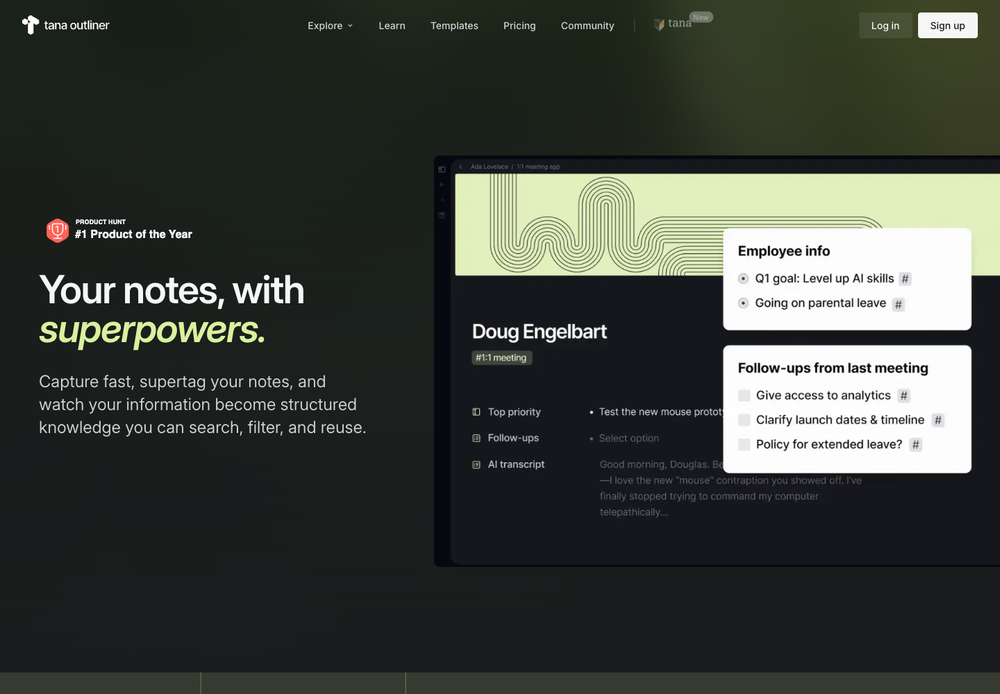
Public Tana Outliner website demo, captured on 2026-10-23. The right-hand side places meeting notes and follow-up tasks in the same information environment, making it useful for examining the product’s organization. This is not the author’s workspace or evidence that this task flow was tested. Source: Outliner website .
Give the task an identity of its own
Outliner’s basic unit is the node: an item in the outline. Each node receives a unique identifier when created, so identical text can represent different objects. A reference lets the same node appear elsewhere. Editing any reference updates the other representations of that object. Nodes and references
The Moss task, “Deduplicate submissions,” can therefore stay in its original meeting location while another interface uses it. The meeting preserves its origin; the task interface gives someone a place to act. This relationship depends on both locations pointing to the same object.
Ordinary copying follows this model too. Copying and pasting inside Outliner creates references by default. An independent copy requires Duplicate. Deleting a reference removes that reference without deleting the original node. Copy-paste and export
This changes an action people have already learned. Someone might copy an old task as a template, rename it, and accidentally change the original object. If I adopted this design, I would make both “reference” and “independent copy” explicit operations, then immediately explain how the new location relates to the original content. Shared identity reduces the effort of maintaining duplicate content. It also makes the product responsible for explaining how far an edit will reach.
Identity gives acceptance testing a small, concrete anchor. Matching titles in two interfaces are insufficient; check that the object links match. Otherwise, two copies of the same text can create an illusion of integration.
Supertags give notes a type; fields add working conditions
A Supertag gives a node a type and a template. Tag a node as Task, for example, and its template can supply fields and child nodes. Nodes of that type can then be queried and organized. The documentation explains type selection through “is a,” which captures its purpose more closely than treating a Supertag as a topical keyword. Supertags
For Project Moss, I would begin with a Task type containing only a project, an assignee, and completion status. The project would be a related object, and the assignee would be selected from members. I would leave complex priority schemes out. This combination is an illustrative design, not a fixed template supplied by Tana.
Field semantics also need individual attention. Outliner’s Options from supertag can offer nodes of a particular type as choices. Invalid field data produces a warning but is still stored. Auto-initialization fills the relevant template field when it is initialized; the value does not keep following its source afterward. Fields
These details change behavior. If the assignee is free text, “Member A” and another name for that person may become separate values. A project field initialized from an ancestor cannot be assumed to change when the task moves elsewhere. A record with a date warning can remain in the system, so downstream automation must decide how to handle it.
I would allow loose capture, then tighten requirements when something enters execution. A task could be recorded without an assignee, for example, but would need one before entering the team’s work queue. That preserves room for quick notes without silently passing missing information downstream. This is an implementation choice I draw from documented behavior, not a disclosure of Tana’s internal validation flow.
Queries bring scattered tasks together
Once the fields exist, we can build the working interface. An Outliner Search node stores a query and returns references to matching nodes. Editing a result changes the original object. Queries run when the search node is expanded, not continuously in the background while it is collapsed. Results are capped at 2,500 nodes. Search nodes
Views then determine how those objects appear. Outline, Table, and Cards can display a node’s children, including search results. Switching views does not change the underlying data. Views
Together, these mechanisms suggest a small experiment readers can reproduce. The following procedure is based on documentation and has not been tested here. Use the operation names and entry points available in your version.
- In a test workspace, create a Task type with project and assignee fields, and give task nodes a completion checkbox.
- Create a meeting node called “Project Moss review.” Under it, create “Deduplicate submissions,” apply the Task type, and fill in the project and assignee.
- Elsewhere, create a Search node. In the query builder, combine Task, the chosen project, and an unfinished condition. These describe conditions, not query syntax to paste.
- Expand the search, switch its results to Table, and check the task link. Change the title, then return to the meeting and check the same object.
- Mark it complete and expand the query again. Check that it leaves the unfinished set while remaining accessible in the meeting record.
These steps test how one object participates in work from different locations. A polished table cannot substitute for checking identity. Disappearing from the unfinished set should not be confused with deleting the original record. If the result differs, inspect the conditions, refresh timing, and whether an independent copy was used by mistake.
My interpretation is that one valuable quality of Outliner is allowing a note to exist first and acquire structure gradually. The cost sits in the same place: a new teammate must distinguish template defaults, references, and query results. The vendor’s split announcement discusses this learning burden, but this research provides no independent data on how long a team actually needs to learn it. Split announcement
The new Tana starts with meetings and still needs usable objects
The new Tana’s homepage places work items and email drafts beside a meeting. Its October 8 changelog also describes a collection of pending actions during a call and a post-meeting view that prioritizes the summary and remaining items. The interface directs attention toward work emerging from the conversation. Tana homepage , October 8, 2026 update
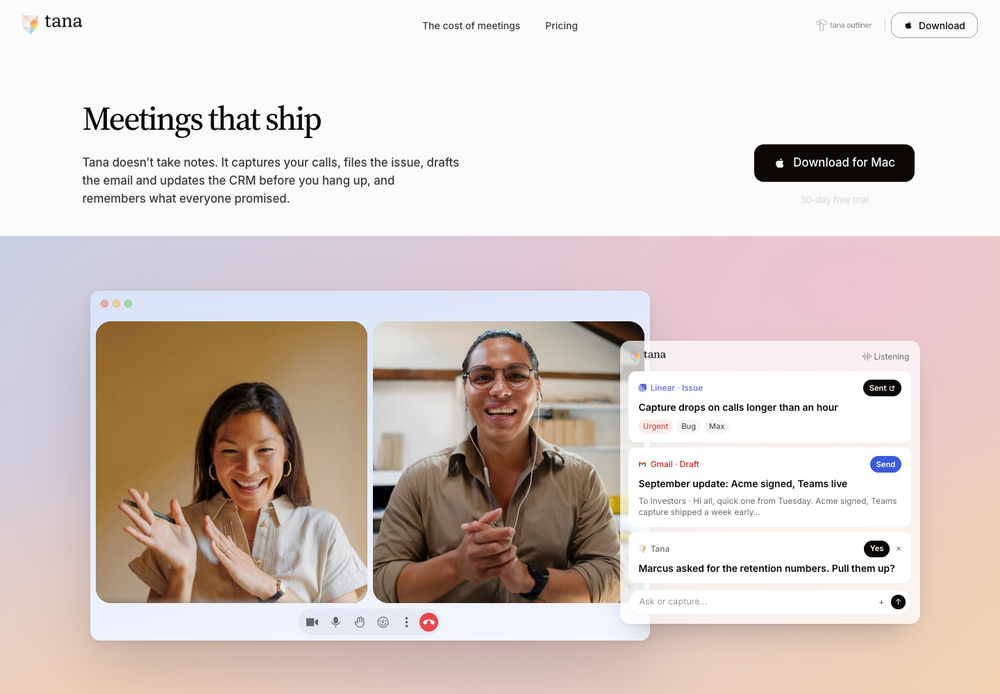
Public new Tana website demo, captured on 2026-10-23. Sent on the issue and Send beside the email distinguish a result from an action awaiting execution. This is a vendor demo, not an outcome produced in this article. Source: Tana website .
Structure remains in the new product. Types give documents shared fields, can define workflows, and can carry AI instructions and skills. A type can be created manually or requested in natural language. This offers another route into modeling; it does not establish that Types and Outliner Supertags are interchangeable. Types
Taking Project Moss through this entrance, I would first have the system propose a draft of “Deduplicate submissions,” then inspect its type and fields. Turning “someone should look into this” directly into a formal assignment would invent a commitment. Even if a person is named in the discussion, preserve the original wording so someone can check whether it was a suggestion, a discussion, or accepted work.
As AI lowers the barrier to entering structured information, the review interface inherits more explanatory work. An object with the right type name and complete fields can still misread the meeting. Builders can watch how people correct drafts. If every correction requires rereading the entire transcript, time saved during input may be spent again during verification. There are no efficiency figures here; those require task-based testing.
Explain what happens between a draft and a change
The new documentation calls AI-initiated content changes proposals and writes to connected services actions. There are automatic-approval exceptions: periodic meeting summaries, screenshot selection, and some background document creation may be approved automatically. The page requires approval for updates, deletions, and space changes. Version history is currently read-only and cannot directly restore an earlier version. Proposals and actions
This boundary deserves a full reading. Calling everything a “suggestion” may imply that nothing has taken effect. Calling everything “handled” can hide pending decisions. In my own product, I would first specify which things are saved automatically and which wait for confirmation, then make the interface match those states. An automatically saved meeting summary and a formal change to a task’s assignee can follow different rules.
After an external action is approved, the same card reports execution, including partial completion, waiting for the user, or failure. Sending an email also requires approving an action first. Proposals and actions
Back in Project Moss, accepting a “create an external work item” action establishes that someone agreed to the operation. The target project may subsequently turn out not to exist, or the external service may not return a clear result. The product needs to keep that action accessible and explain what happens next.
My first implementation would record the proposal version separately from execution. Which content Member A confirmed, whether someone else has since changed the task, and what the external system returned all need to remain connected. If content changes after approval, show the differences again. If the result is uncertain, inspect the external record before deciding to retry. These are suggested commit semantics; public sources do not establish that Tana implements them this way.
Spaces determine visibility; connections determine capabilities
In the new Tana, Spaces organize both content and context. Access inherits from organization to space to document. A new space is private to its creator by default, and a document can tighten access further. Spaces can also define their own types and AI instructions. Spaces and sharing
Meeting outputs therefore have another destination to verify. A correct task placed in the wrong space may still expose information to the wrong people. My review card would show the destination and audience alongside the task. If the operation changes access, it would show that change separately. Users should not have to discover the destination in navigation after accepting it.
Context cannot simply be inferred from terminology in the older product either. Outliner’s AI Chat requires notes to be added explicitly, through references and other methods. Its documentation says it cannot chat with the entire graph. AI Chat
The new product’s Agents are documented as having a prompt, capabilities, and an optional schedule. They can be used in chat or by voice, or run on a schedule. This defines configuration entry points; it does not establish long-task reliability or how retries avoid duplicate side effects. Agents
Interfaces need to be distinguished by product too. Outliner’s local MCP is free but requires the desktop app to remain running. Its hosted MCP is currently a paid beta. The documentation also describes connecting the new Tana to Outliner through MCP and recommends carrying original node identifiers across for precise reads and writes. API and MCP
The new product has a separate MCP service. Writes generate proposals awaiting review by default. If the user explicitly chooses to skip review, supporting tools can receive autoApprove: true and apply the proposals in the same round-trip. An ordinary request to make a change does not count as skipping review, and some tools do not support the parameter. Direct application already authorized by a user must be distinguished from opening the interface to review every change. MCP: How writes work
A connection gives tools access to objects without automatically resolving their correspondence across systems. If the Moss task appeared in both products, I would still retain the source node and target object identifiers, and specify which side owns each field. Without that agreement, renaming a task could break the link to its original or lead to duplicate creation. The documentation establishes a bridge, not evidence of a shared database or lossless automatic synchronization.
For a first release, preserve the task’s origin
Applying these observations to my own product, I would start with a narrow path: one meeting record produces one candidate task, a person confirms it, and it enters the same product’s task list. Input would begin as text; external integrations could follow later. The data relationships below are suggestions, not Tana’s actual backend.
| What to retain | What it means in Project Moss | How to check the first release |
|---|---|---|
| Stable task identifier | This particular “Deduplicate submissions” task | Renaming it leaves the meeting link pointing to the same object |
| Source and evidence location | The relevant passage in a particular meeting | Opening the task leads back to its basis without guessing from the title |
| Type and field values | Task, project, and assignee | A missing assignee permits a draft but produces a clear prompt before execution |
| Destination space and access scope | Who should see the task | Unauthorized users cannot read its body through queries or related items |
| Proposal version and approval record | The version a person confirmed | Editing after preview prevents an old approval from covering the new version |
| Execution record and external identifier | Whether the work item was created | Existing results can be checked before retrying to avoid duplicates |
The database choice can come later. These relationships can first be expressed in conventional storage. A graph database should depend on actual queries and scale; this research found no disclosed server-side design that builders could simply copy.
I would first establish that identity and references remain distinct, then add structured queries. After AI extracts candidate tasks from text, introduce an editable preview. Only then enable one external write destination. At each stage, retain the previous manual entry point. If extraction fails, a person can still complete the task, and debugging can identify which stage failed.
Acceptance testing also needs things to go wrong: two people changing the assignee, an old proposal being reopened, a double click on approval, or external creation succeeding without a receipt reaching the caller. These reveal more than a successful demo. Record duplicate objects, lost changes, and whether users can understand the current state from the interface. This is a test method, not a report of testing these cases in Tana.
Long-term use requires working offline and being able to leave
The more objects reference each other, the more carefully an exit needs to be checked. Outliner exports Markdown and JSON. Of its JSON formats, Tana Intermediate Format 2.1 can be imported into a new workspace, while the full Tana JSON cannot be restored through that same importer. Copy-paste and export
The workspace documentation also says Markdown exports retain media download links without including the image and video files themselves. Workspaces: Export workspace
Imports have losses too. Native Notion import does not preserve database relations, custom views, or workspace automations. Import data into Tana Outliner
If Project Moss needed to migrate, I would move a small sample first, check the task text, fields, and source relationships, then inspect media separately. Finally, I would try continuing the task in the new environment. Opening a file establishes readability; preserving the working process needs a separate check. Although the new Tana’s pricing page promises export to other systems, this research obtained no comparably detailed evidence for organization-wide export and recovery. Outliner’s documentation cannot establish those capabilities for the new product. Tana data statement
Offline use has a scope as well. In Outliner’s full offline mode, personal workspaces are editable and shared workspaces are read-only. AI and third-party integrations require connectivity. Edits made in a shared workspace during a temporary disconnection may overwrite other edits when synchronization resumes. Tana Outliner for desktop
That affects the promise made to a team. Editing personal notes while traveling and safely collaborating across an offline team need separate verification. I would have offline status directly affect available operations and their explanations, rather than waiting for synchronization to reveal a conflict.
Trial costs also need to be considered separately. Both products currently have free plans. The new Tana lists five hosted meetings per month and 50 AI queries; Outliner lists 500 AI credits. The units are different and do not support a direct comparison. Before choosing a product, check the required interfaces and plan under the actual billing cycle. Tana pricing , Outliner pricing
Let one person finish one piece of work first
The design lesson I draw from Tana is to preserve an item’s identity and origin as it participates in later work. Outliner expresses this through reusable nodes and queries. The new product puts drafts and execution closer to the conversation that produces them. Both entrances face the same acceptance question: where is the task now, who can see it, what has taken effect, and what still awaits a decision?
For my own first release, I would take a small example like Project Moss through the path from recording to confirmation. Ask someone who did not design the product to handle “Deduplicate submissions.” Can they find the original wording, correct the assignee, and tell whether the operation succeeded? Once that process works, there is a basis for testing more types, a larger knowledge base, and automated execution.
References
All sources below are public official materials checked on 2026-10-23. Read their documented capabilities separately from this article’s suggestions.
- Tana homepage
- Tana Outliner homepage
- The next chapter for Tana, March 31, 2026
- Tana Changelog
- Tana Outliner Changelog
- Nodes and references
- Copy-paste and export
- Supertags
- Fields
- Search nodes
- Views
- Types
- Proposals and actions
- Spaces and sharing
- AI Chat
- Agents
- API and MCP
- MCP
- Workspaces — Export workspace
- Import data into Tana Outliner from other tools
- Tana Outliner for desktop
- Tana Pricing
- Tana Outliner Pricing
Responses