A model needs a tool to check project status. A user asks, “What’s blocking the demo project?” The model understands the question, but has no way to read the project’s state. The experience we want is straightforward: the user adds their project service, authorizes access once, then returns to the same conversation and gets an answer grounded in data.
What this article verifies
Sources were checked as of October 3, 2026, using Nango source and client version 0.71.12. The local examples use Node.js 22+ and have been tested for tool discovery, input validation, and request/response handling, including a local replacement for the proxy adapter. Project data is synthetic; the experiment does not call a model or execute real OAuth and proxy requests through Nango Cloud. The public-server sections provide integration steps to test in your own account. Rolling documentation, pinned source, and cloud deployments may differ; a dependency version does not prove protocol support, and customer stories establish only their stated use cases. The available evidence also does not establish that external MCP tools are automatically imported into Nango’s Action catalog.
The whole path in one sentence
The user supplies a tool server URL, Nango stores the authorization credentials, your backend chooses the right account and calls the tool, and the model uses the result to answer.
Think of MCP as a tool menu with ordering rules. The menu tells a client what tools exist; the rules specify their inputs and results. Its full name is Model Context Protocol. Nango provides the authorization and request-forwarding infrastructure. The model chooses an action, while your backend enforces the conditions for execution, so a new tool can be connected at runtime.
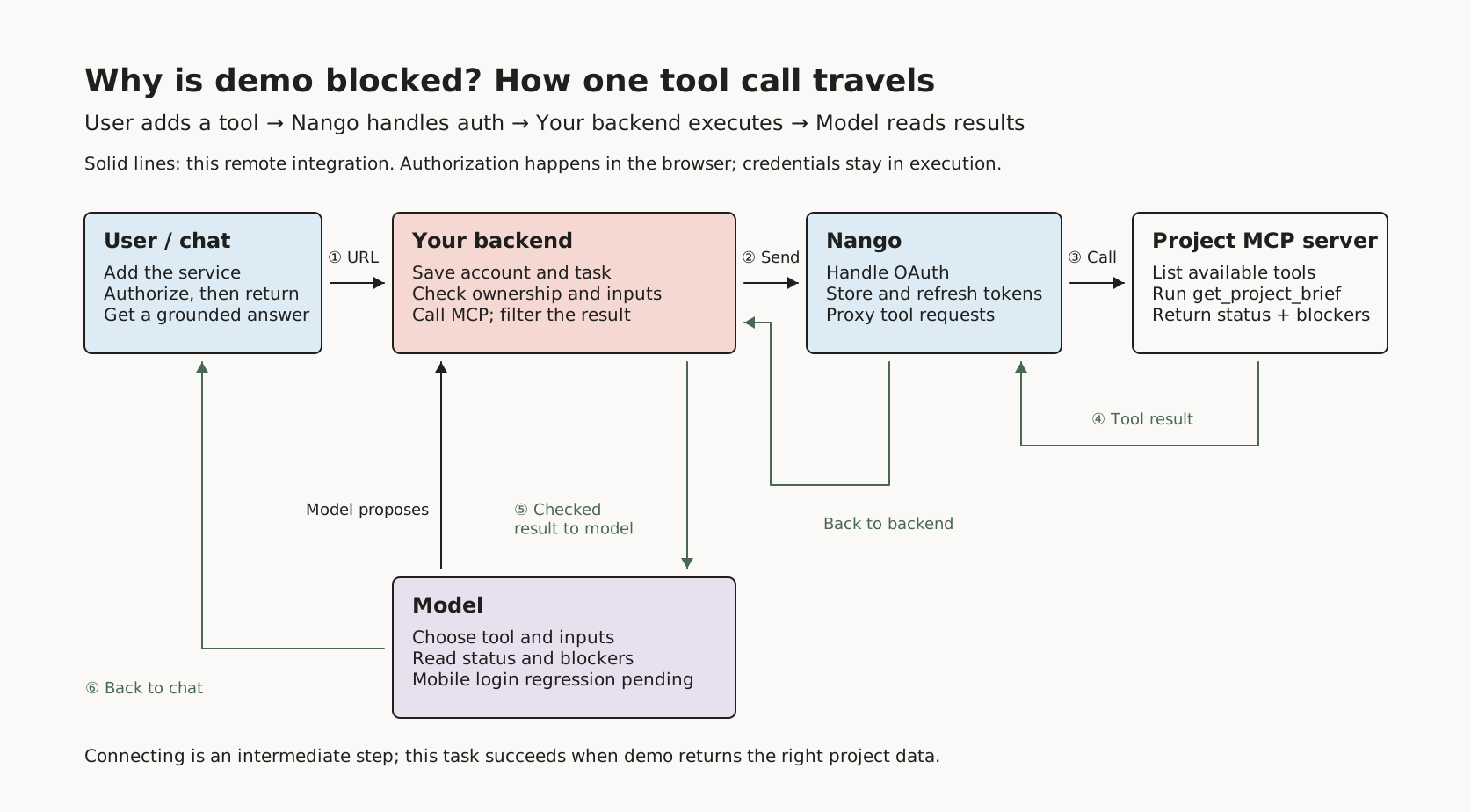
The middle of this diagram belongs in your product. Your backend records which external connection belongs to the current user and what the conversation is waiting for. Once authorization finishes, it resumes from that point. Nango’s tags help associate records; your product checks access permissions, so switching accounts also switches the account used for the query.
Walk through it: make the demo project return data
First establish that the tool exists, its inputs are valid, and its results are readable. Adding authorization afterward makes debugging much easier. We will prepare the project service in that order, then follow the user’s path through adding and using it.
Turn the project query into a tool
This step packages “What’s blocking the project?” as a named function with an input. The service exposes only get_project_brief, which takes a project identifier, projectKey. We will start with one demonstration record and add a database and business permissions before production.
Install the dependencies in a separate directory. These are pinned SDK v2 packages, so the imports stay consistent rather than mixing in an older tutorial:
npm init -y
npm install --save-exact @modelcontextprotocol/server@2.3.0 @modelcontextprotocol/client@2.3.0 @modelcontextprotocol/node@2.1.1 zod@4.6.5
Save this as server.mjs, then run node server.mjs:
import { createServer } from 'node:http';
import { McpServer, createMcpHandler } from '@modelcontextprotocol/server';
import { toNodeHandler, localhostHostValidation, localhostOriginValidation } from '@modelcontextprotocol/node';
import * as z from 'zod/v4';

const projects = { demo: {
  name: 'Demo project', status: 'Awaiting acceptance',
  blockers: ['Mobile login regression testing is not finished'], synthetic: true
} };
const handler = createMcpHandler(() => {
  const server = new McpServer({ name: 'project-brief', version: '1.0.0' });
  server.registerTool('get_project_brief', {
    description: 'Read a project status and its blockers.',
    inputSchema: z.object({ projectKey: z.string().min(1).max(64) }),
    annotations: { readOnlyHint: true }
  }, async ({ projectKey }) => {
    const project = Object.hasOwn(projects, projectKey) ? projects[projectKey] : undefined;
    return project
      ? { structuredContent: { project }, content: [{ type: 'text', text: JSON.stringify(project) }] }
      : { isError: true, content: [{ type: 'text', text: 'PROJECT_NOT_FOUND' }] };
  });
  return server;
}, { responseMode: 'json' });

const handle = toNodeHandler(handler);
const hostOK = localhostHostValidation(), originOK = localhostOriginValidation();
createServer((req, res) => {
  if (!hostOK(req, res) || !originOK(req, res)) return;
  if (req.url !== '/mcp') return res.writeHead(404).end();
  void handle(req, res);
}).listen(43173, '127.0.0.1', () => console.log('MCP: http://127.0.0.1:43173/mcp'));
There is now a project tool menu at http://127.0.0.1:43173/mcp. Like instructions on a form, inputSchema requires projectKey to be a string of 1–64 characters, so a number is rejected. A missing project produces a tool error. structuredContent holds machine-readable data, while content provides its text representation; both come from the same demonstration record.
The service binds locally and checks Host and Origin. A JSON response is enough for this quick query. Intermediate notifications during a long-running call need a different response mode; keep that distinction in mind when we add the proxy. SDK HTTP integration guide
Query the demo project locally first
This step retrieves the tool’s actual definition, then runs one project query. The client gets the menu with tools/list and places an order with tools/call. During development, we can hard-code projectKey: 'demo' to test the data path the model will later use.
Keep the server running in the first terminal. In a second terminal, save this as client.mjs and run node client.mjs:
import { Client, StreamableHTTPClientTransport } from '@modelcontextprotocol/client';

const client = new Client(
  { name: 'chat-demo', version: '1.0.0' },
  { versionNegotiation: { mode: 'auto' } }
);
try {
  await client.connect(new StreamableHTTPClientTransport(
    new URL('http://127.0.0.1:43173/mcp')
  ));
  console.log(JSON.stringify(await client.listTools(), null, 2));
  const result = await client.callTool({
    name: 'get_project_brief', arguments: { projectKey: 'demo' }
  });
  console.log(result.isError ? result.content : result.structuredContent.project);
} finally {
  await client.close();
}
You first see the tool name and input schema, followed by “Awaiting acceptance” and “Mobile login regression testing is not finished.” The minimal demo works. A nonexistent project returns PROJECT_NOT_FOUND, while the wrong input type is rejected. We have now tested “the tool exists” separately from “the business query succeeds.”
The local experiment is complete: the menu, inputs, and result have all made the round trip. Next, deploy the same tool as a public HTTPS service, connect an authorization service and publish its metadata, add caller permissions to the database query, and replace the localhost validation settings with the domains and Origins you actually allow. Users can then add that service.
Let the user add the remote service in chat
This step gives the conversation a service entry point from which it can discover tools. The user is still waiting for the demo project’s answer. Your product can offer “Add project tool,” accepting a pasted URL or a selection from a directory.
A cloud product should accept a remote service address, such as https://mcp.example.com/mcp. localhost means the machine running the code; reaching a service on the user’s computer needs a local client or an isolated runtime. If the user supplies a package that must be started, your product also needs a runner. Nango Generic does not start that process.
A directory can read from the official MCP Registry. This command retrieves the latest public entries with notion in their names:
curl 'https://registry.modelcontextprotocol.io/v0.1/servers?search=notion&version=latest&limit=10'
search matches a substring of the name, so “find a tool that checks project progress” needs your product’s own search and ranking. remotes describes remote addresses, while packages describes installable packages. Use metadata.nextCursor for the next page. Your product can cache the directory and synchronize deprecated and deleted entries, because the Registry does not guarantee uptime or data persistence.
For the demo project, both the directory and a custom URL should lead into the same connection flow. Show the publisher and actual domain first, then check whether the connection method fits. Being listed is not a security endorsement. After the user selects a service, preserve the original task in a waiting state, so they do not have to repeat the question after authorization. Registry API
Give the user a short-lived authorization entry point
This step lets the user grant your product access to the project account, with Nango storing the credentials. We are using the remote OAuth route. Nango Generic currently requires automatic client registration: DCR lets the client register with the service, while CIMD lets the service read a document describing the client.
The development team first configures MCP Server OAuth2 (Generic) in the dashboard and names the integration user-mcp. Multiple users can use it to connect their own servers, but each authorization creates a separate connection. A fixed OAuth client needs the appropriate provider configuration. API-key and unauthenticated services have their own routes and do not use this Generic OAuth flow.
Install npm install --save-exact @nangohq/node@0.71.12, then save this as connect.mjs. Set the backend environment variables NANGO_API_KEY and the approved public MCP_URL, run node connect.mjs, and open the printed link to authorize access:
import { Nango } from '@nangohq/node';
import { randomUUID } from 'node:crypto';

const apiKey = process.env.NANGO_API_KEY, mcpUrl = process.env.MCP_URL;
if (!apiKey || !mcpUrl) throw new Error('Set NANGO_API_KEY and MCP_URL');
if (new URL(mcpUrl).protocol !== 'https:') throw new Error('MCP_URL must use HTTPS');
const nango = new Nango({ apiKey });
const { data } = await nango.createConnectSession({
  allowed_integrations: ['user-mcp'],
  tags: {
    end_user_id: 'demo-user', organization_id: 'demo-org',
    connect_request_id: randomUUID()
  },
  integrations_config_defaults: {
    'user-mcp': { connection_config: { mcp_server_url: mcpUrl } }
  }
});
console.log(data.connect_link);
Three values do different jobs here. user-mcp selects the integration; tags associate the user with this connection request; mcp_server_url fixes the destination. The URL belongs at this nested level. Session configuration takes precedence over frontend parameters, and prefilled fields are hidden in Connect UI. Without a prefilled URL, the user enters it in the authorization interface.
Think of this entry point as a short-lived admission ticket. Its formal name is a Connect session, and its current lifetime is 30 minutes. The returned token or connect_link can go to the frontend; the environment API key stays on the backend. In the real product, replace the demonstration identity with one verified by your login system and save a pending authorization record.
The chat interface can open Connect UI through the frontend SDK. Open the window in the button’s click handler, then set the session token asynchronously to reduce popup blocking. After authorization, Nango sends the backend a receipt—an event notification called a webhook. Once the backend verifies it, your own status query or event push resumes the original conversation. Nango MCP Auth
Bring the query back into the same conversation
This step puts the tested project query back into the user’s original question. The backend executes it using the newly authorized connection, the model explains the demo project’s blockers from the result, and the frontend continues displaying the same task.
Adapt the tool definitions to the model interface you use. From “What’s blocking the demo project?”, the model proposes a tool name and inputs. The backend selects a connection from the current user’s records, validates the inputs, and executes. It then returns the data to the model as the output of that tool call, allowing the answer to address the project’s actual blockers.
This numbered request envelope is called JSON-RPC, and id matches a response to its request. The business input is arguments.projectKey; connectionId selects the external account. If several services expose search, your backend also needs a routing table mapping the model-visible name to a product connection and external tool name, so it does not choose the wrong service.
Give the model only the needed fields and their sources, and give the frontend the answer and task state. The user should see which account was queried and whether the result covers the request. For creating a task or sending a notification, show the destination and content first, then return an object ID or link after execution. If a request was sent but its result is unknown, display “Outcome pending confirmation.” Save this as Call the same tool through Nango: a complete backend script
cloud-client.mjs. Set NANGO_API_KEY, NANGO_CONNECTION_ID, and the approved MCP_URL, then run it. The integration is still user-mcp; use the connection record saved in Nango Connections after authorization. It preserves the SDK request body and returned Response, accepts only a POST path confirmed to support the new protocol, and rejects a changed destination. Beyond this URL check, apply your network egress, DNS, and redirect policies.import { Client, StreamableHTTPClientTransport } from '@modelcontextprotocol/client';
const url = new URL(process.env.MCP_URL);
const proxyFetch = async (input, init = {}) => {
const target = input instanceof Request ? input.url : String(input);
if (new URL(target).href !== url.href || init.method?.toUpperCase() !== 'POST') {
throw new Error('Unexpected MCP target or method');
}
const headers = new Headers({
Authorization: `Bearer ${process.env.NANGO_API_KEY}`,
'Provider-Config-Key': 'user-mcp',
'Connection-Id': process.env.NANGO_CONNECTION_ID,
'Base-Url-Override': url.href, Retries: '0',
'Content-Type': 'application/json'
});
const original = new Headers(init.headers);
for (const name of ['content-type', 'accept', 'mcp-protocol-version', 'mcp-method', 'mcp-name']) {
if (original.has(name)) headers.set(`Nango-Proxy-${name}`, original.get(name));
}
return fetch('https://api.nango.dev/proxy', {
method: 'POST', headers, body: init.body, signal: init.signal, redirect: 'error'
});
};
const client = new Client(
{ name: 'chat-demo', version: '1.0.0' },
{ versionNegotiation: { mode: { pin: '2026-07-28' } } }
);
try {
await client.connect(new StreamableHTTPClientTransport(url, { fetch: proxyFetch }));
console.log(await client.listTools());
console.log(await client.callTool({ name: 'get_project_brief', arguments: { projectKey: 'demo' } }));
} finally {
await client.close();
}
Fix these five traps before production
Querying the demo project locally solves the calling problem. Production also needs control over accounts, network destinations, and what happens after failure.
Authorization succeeds, but the result belongs to someone else
Symptom: the demo query returns data from another account or organization. Cause: an environment API key can select a connection, but tags and valid input formats do not enforce product-user or project-level permissions. What to do: resolve the connection from the authenticated identity on every call and check resource ownership in the actual query; keep personal, company, and organization-shared accounts separate, and bind write approval to the specific tool and inputs.
The URL is correct, but the tool still will not connect
Symptom: authorization is followed by
unsupported_provider, a protocol error, or a request to the wrong destination. Cause: Generic registration requirements, the proxy destination, and protocol forwarding are three separate configurations; a remote URL also triggers authorization discovery and network access. What to do: review the HTTPS destination and discovered endpoints, handle headers and response streams for the actual protocol, provide a separate controlled route for private-network access, and complete tool discovery before querying demo.One timeout creates two tasks
Symptom: the user approves once, but the system writes twice. Cause: the request may succeed while the response is lost; a JSON-RPC request ID does not deduplicate business writes, and disconnecting does not undo them. What to do: avoid blind retries for writes, record an unknown outcome as
outcome_unknown, and use upstream idempotency or business-operation records to check the result before retrying, compensating, or asking the user to act.The tool is on the menu, but the model supplies the wrong inputs
Symptom: discovery succeeds, but execution has missing fields or wrong types, or the model follows extra instructions in a tool result. Cause: the input schema may be incomplete, names may collide, and service descriptions, read-only claims, and returned content are external data. What to do: retain the original schema for backend validation, including nesting and references, and enforce tool permissions and write approval in execution code; show the destination before sending sensitive inputs to an unfamiliar service, and limit call counts and time budgets.
The second visit starts from scratch
Symptom: after an expired token, a changed schema, or a temporary failure, the user must authorize again and repeat the task. Cause: connections, conversation tasks, and temporary execution permissions have separate lifecycles that a “Connected” message cannot maintain. What to do: save the waiting point and completed work, reconnect the existing connection, and refresh the tool cache; recheck permissions when temporary access expires, verify writes already sent, and continue with the results preserved.
Connection verification and protocol details for traps 1 and 2
For an authorization event, check type=auth, operation=creation, and success=true, then verify the environment, provider, and providerConfigKey. Use the backend-generated connect_request_id to find the pending record, check user and organization ownership, and compare connection_config.mcp_server_url with the approved URL. Metadata reads can omit environment:connections:read_credentials, avoiding accidental credential retrieval into logs.
Verify the raw body’s X-Nango-Hmac-Sha256 using the separate Webhook signing key. Do not parse and reserialize the body first. Configure webhookSigningKey in the Node SDK to call verifyIncomingWebhookRequest. Persist the event reliably before acknowledging it, and make background verification and connection writes idempotent. Repeated webhooks or frontend refreshes should not create duplicate connections.
A connection starts as discovering and becomes ready after protocol negotiation and menu retrieval. Record the first successful business call separately as task acceptance. Public deployment also needs an authorization service and metadata, database queries with caller permissions, and replacement of the local validation settings.
The pinned Generic implementation has no default proxy destination, so calls must supply the full MCP URL explicitly. Server configuration may also disable or reject a URL override. The proxy removes a trailing slash before combining the URL with the endpoint, so a service that strictly requires /mcp/ needs this difference handled. Prefix headers intended for the service with Nango-Proxy-; the proxy strips that prefix before forwarding. Proxy header implementation
The 2026-07-28 protocol uses per-request _meta and matching protocol headers, and supports server/discover. The SDK’s auto mode handles probing. Older services may use initialize and session headers, which the appropriate client must manage; not every error should trigger a legacy fallback. The pinned Nango Agent Sessions implementation still uses a compatibility entry point, so choose the client protocol from the server’s actual advertisements and responses.
An upstream service can return JSON or SSE. The client parses according to Content-Type, so the adapter must not always call response.json(). Requests for further user input in the new protocol need a waiting task state. After HTTP success, check JSON-RPC errors, the tool’s isError, and whether it completed; the new completion marker is resultType=complete. Distinguish the raw protocol response from the SDK’s unpacked result. Use nextCursor for tool pagination and isolate caches by connection and authorization scope.
Input discovery and ongoing maintenance for traps 4 and 5
Inputs may include nested objects, array constraints, or $ref, so adapt the structure accepted by the model interface without discarding the original validation rules. Directory search and Nango tool search also differ. Core capabilities can resemble predefined operation scripts, deployed as Action functions. A temporary tool permission sheet, Agent Sessions, then specifies connections, allowed actions, and lifetime; user-provided services follow the external MCP integration path.
This permission sheet returns mcp_url and session_token. Keep the token in the backend transport. A session could restrict an existing GitHub connection to get-repository, enable nango_tool_search and nango_execute, leave the general nango_proxy disabled, and set expires_in=5m. Adjust those five minutes to the task. Sessions cannot be extended; termination blocks new requests but does not cancel calls already running. Agent Sessions
The pinned search implementation uses Fuse fuzzy text matching. Tokenization with /[^a-z0-9]+/ leaves a Chinese-only query with no terms, so a Chinese-language product needs English operation queries or its own search. Pinned actions expose an empty object schema allowing additional properties; the best search matches retrieve the input model. An absent input and an unavailable input schema are different states: the latter does not mean no input is needed, and the model should not guess required fields.
A token refresh failure may be temporary; Nango reports failure and recovery. Persistent failure calls for a reconnect session. Deleting and recreating a connection can change or lose its data and configuration. Disabling it in your product, deleting it, and revoking authorization at the provider are separate operations; external data already created is not retracted. After authorization recovers, check the original approval, whether execution already happened, and whether data changed before resuming the task.
Store a timestamp or structural digest with the tool cache, and review changed write tools again. Keep core function code in source control, start from templates and narrow the output, and update through tests and a release process. AI-generated functions additionally need compilation, a dry run, and deployment; connecting an existing service and shipping new code are separate processes.
Operational records should connect the conversation task, account, and external result, separating authorization, input, upstream, and unknown-outcome failures. Redact credentials from logs and handle private documents according to access and retention rules. Before each release, test cross-user access, rejected inputs, repeated events, cancellation, and partial success. Test SDK and upstream changes with a test connection first. Track authorization completion alongside first-task success, latency, repeated work, and cost, then reduce unused tools.
If user-provided MCP is the central feature, the first version should finish a tested remote integration before adding a broader directory, local execution, and other authentication methods. If the product primarily delivers fixed business tasks, start with a few Actions and add extension entry points later. Both choices use a real task result as the first-experience acceptance test; connector counts alone do not establish task effectiveness.
Add synchronization checks when you need continuously updated external data. Nango’s Replit story describes triggers across more than 30 connectors and incremental synchronization. A coding assistant can use Management MCP to configure and debug integrations, while end-user runtime permissions stay separate. Cloud, managed hosting in your own cloud, and self-managed deployment carry different operational responsibilities. The repository uses Elastic License 2.0, so check self-hosted feature coverage together with hosting restrictions.
Use GitHub first to rule out Nango account configuration problems
The official Quickstart uses github-getting-started. Create and authorize a test connection, enable get-repository under Functions, and put the connection ID in NANGO_CONNECTION_ID. Save this as check-nango.mjs, set the backend NANGO_API_KEY, and run it. For execution failures, inspect the connection and external request in Logs. This check uses the Nango Action route.
import { Nango } from '@nangohq/node';

const nango = new Nango({ apiKey: process.env.NANGO_API_KEY });
console.log(await nango.triggerAction(
  'github-getting-started', process.env.NANGO_CONNECTION_ID,
  'get-repository', { owner: 'NangoHQ', repo: 'nango' }
));
When creating a Generic integration through the API, put your integration ID in unique_key, set provider=mcp-generic and credential type MCP_OAUTH2_GENERIC, and use client_name and client_uri to describe your product’s client. The end user’s access token comes from OAuth afterward. The frontend uses Connect UI from @nangohq/frontend@0.71.12. A connect event updates the interface first; the verified backend event establishes ownership.
Return to the user’s original question
The user selects a tool, Nango stores the authorization, your backend executes with the current account, and the model reads the result.
Run the demo project through menu discovery, inputs, and results first, then bring authorization and task recovery back into the original conversation so the user gets a grounded answer.
Fix these five traps before production and keep connections and tool versions maintained, so the next “What’s blocking the demo project?” does not start from scratch.
References
- Nango pinned source baseline (6b794c6)
- Version manifest
- Nango MCP Auth: catalog and custom server integrations
- MCP transports
- Nango Agent Sessions: connection scope, tools, and lifecycle
- Connection ownership requirements
- Official Registry API
- Server description format
- Registry moderation policy
- Registry aggregation guidance
- Nango Connect session API: authorization parameters
- MCP Tools: discovery, input schemas, and results
- Official Quickstart
- Create integration API
- Pinned input validation
- Connect session request types
- Authorization configuration merging
- Frontend SDK
- Nango Webhooks: connection events and signatures
- Read a connection
- Connection metadata permissions
- Signature verification implementation
- Protocol version negotiation
- Nango session server entry point
- SDK modern and legacy entry points
- Generic provider configuration
- Nango Proxy source: configuration and URL assembly
- Proxy header parsing
- MCP Streamable HTTP: headers, versions, and response streams
- SDK versions and packages
- SDK HTTP server guide
- SDK client connection guide
- MCP authorization specification
- Nango Generic requirements
- Tool search implementation
- Pinned schema implementation
- Agent permission design
- Generic URL discovery implementation
- MCP security practices
- Proxy retry implementation
- Token refreshing
- Delete connection API
- Functions development workflow
- Replit customer story
- Self-managed deployment
- Pinned license
- Management MCP responsibilities



Responses