
A long report can look like certainty while merely arranging uncertainty more elegantly. The useful question is not how many pages an agent writes, but how a claim entered the report and whether a reader can walk back to its source.
The short verdict
GPT Researcher is a good fit when a team needs a programmable research pipeline, source traceability, and deployment control. It is not a truth machine. It automates planning, retrieval, context assembly, and report writing; it does not make weak pages authoritative or make every citation support the sentence beside it.
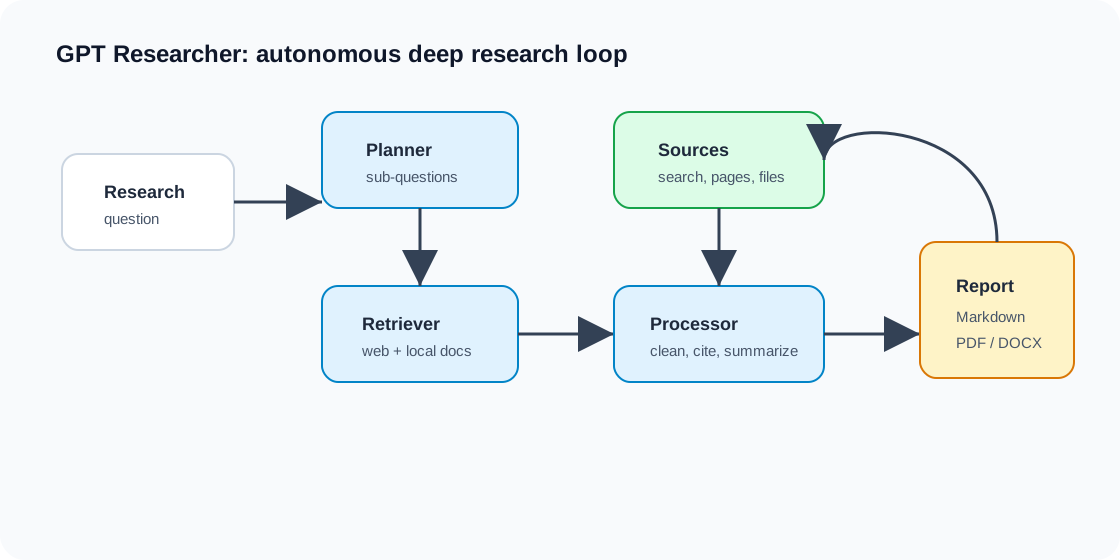
I find it more useful to see the system as three separable acts:
- Plan a broad request into searchable directions.
- Gather web or local material and preserve its source trail.
- Write a report from the accumulated research context.
That separation is the engineering value. It also reveals where failures live. “Nothing useful was retrieved” is a different problem from “the model misread useful evidence,” and both differ from “the report was written for the wrong audience.”
Audit baseline: pin a snapshot before explaining the code
This article was re-audited in July 2026 against the official repository snapshot:
- Git release:
v3.5.0 - Commit:
b364917f55ea579c47e5ef3f038f7e56f51213df - Package metadata version at that commit:
0.14.7 - Required Python version:
>=3.11
The Git release, package version, and moving default branch are different clocks. Pinning the commit keeps the API, dependency, and deployment claims below reproducible. If you install a later package or follow the current default branch, check its release notes and configuration reference again.
The current library path has two explicit stages
The official PIP example uses conduct_research() followed by write_report():
from gpt_researcher import GPTResearcher

researcher = GPTResearcher(query="What should we know before adopting passkeys?")
research_result = await researcher.conduct_research()
report = await researcher.write_report()
conduct_research() builds the research context. write_report() consumes that context to produce the report. Keeping those steps visible gives an application useful control points:
- inspect sources before paying for final synthesis;
- record retrieval and writing latency separately;
- retry report generation without repeating every search;
- reject an empty or low-quality context before publishing;
- compare report prompts against the same evidence set.
Older tutorials may show a one-shot helper or a repository CLI. They can still explain the project’s history, but they should not replace this two-stage API as the integration baseline.
A minimal runnable Python example
Create a Python 3.11+ virtual environment and install the package:
python3.11 -m venv .venv
source .venv/bin/activate
python -m pip install --upgrade pip
python -m pip install gpt-researcher

export OPENAI_API_KEY="..."
export TAVILY_API_KEY="..."
Save the following as research.py:
import asyncio
from pathlib import Path

from gpt_researcher import GPTResearcher


async def main() -> None:
    query = (
        "Compare passkey rollout risks for a 500-person SaaS company. "
        "Prefer standards bodies and vendor documentation."
    )
    researcher = GPTResearcher(query=query)

    context = await researcher.conduct_research()
    if not context:
        raise RuntimeError("Research returned no usable context; do not write a report.")

    report = await researcher.write_report()
    if not report.strip():
        raise RuntimeError("Report generation returned empty output.")

    Path("report.md").write_text(report, encoding="utf-8")
    print("Wrote report.md")


if __name__ == "__main__":
    asyncio.run(main())
Then run:
python research.py
Open report.md, but inspect the returned research context and cited pages before treating the report as an answer. The code is deliberately small: production readiness begins after the happy path works.
The OpenAI and Tavily variables above match the official quick-start combination, not an exclusive requirement. GPT Researcher supports multiple model and retriever configurations. Provider names, model identifiers, and related environment variables can change, so verify them against the documentation for the exact version you deploy.
How the pipeline works without inventing internals
The official README describes a planner, execution agents, and a publisher:
- the planner derives research questions from the original task;
- execution agents gather relevant material for those questions;
- resources are summarized while their sources are tracked;
- the publisher filters and aggregates the findings into a report.
This high-level model explains both latency and cost. A research run is not one model completion. It combines planning, several retrieval branches, page processing, context management, and final synthesis.
It is tempting to read a dependency file and declare that every run uses Selenium, a vector database, or a particular parser. A dependency only proves that a component can be installed or supported. To assert that it participates in a run, trace the chosen configuration through the relevant factory and call path.
Running the repository with Uvicorn
For the audited snapshot, the official setup starts a FastAPI service with Uvicorn:
git clone https://github.com/assafelovic/gpt-researcher.git
cd gpt-researcher
git checkout b364917f55ea579c47e5ef3f038f7e56f51213df

python3.11 -m venv .venv
source .venv/bin/activate
python -m pip install -r requirements.txt

export OPENAI_API_KEY="..."
export TAVILY_API_KEY="..."
python -m uvicorn main:app --reload
The local service is available at http://localhost:8000. --reload is a development convenience, not a production setting. A deployed service still needs process supervision, timeouts, request limits, authentication, outbound-network policy, and a deliberate worker model.
Docker makes the environment repeatable, not safe
The repository also provides a Compose path:
cp .env.example .env
# Add provider credentials to .env.
docker compose up --build
The default flow starts the Python server on port 8000 and the React application on port 3000. That is enough for evaluation, but a container does not answer the production questions:
- Where are API keys stored and rotated?
- Which domains may the crawler reach?
- Are prompts, page extracts, and reports written to logs?
- What happens when a page blocks automation or never responds?
- Which state survives a restart?
- How many concurrent research runs can the host afford?
Keep credentials outside images and source control. Apply CPU and memory limits, restrict egress where possible, and put authentication in front of any remotely reachable endpoint.
Cost is a model, not a marketing number
The code is Apache-2.0 licensed. That describes how the repository may be used and redistributed; it does not erase compute, storage, operations, model, or search costs.
Model a run with variables you can measure:
LLM cost =
  (input_tokens / 1,000,000 × input_price_per_million)
  + (output_tokens / 1,000,000 × output_price_per_million)

Search cost =
  billable_search_requests × price_per_search

Expected retry cost =
  (LLM cost + Search cost) × average_additional_attempts

Total run cost =
  LLM cost + Search cost + Expected retry cost
  + allocated_compute + storage + observability
For a concrete estimate, collect these variables per run:
| Variable | What to record |
|---|---|
input_tokens, output_tokens | Split by planner, research branches, and report writer |
billable_search_requests | Include rewritten queries and retries |
pages_attempted, pages_succeeded | A high failure ratio explains cost without evidence gain |
elapsed_seconds | Record median and P95, not only the best run |
average_additional_attempts | Include model, search, and crawl retries |
allocated_compute | Runtime multiplied by the host’s effective hourly cost |
The official README gives one historical estimate for its recursive deep-research mode: about five minutes and roughly $0.40 per run using o3-mini with high reasoning effort. Treat it as a configuration-specific illustration, not a quote or service-level promise. Model prices, search prices, breadth, depth, report length, and retry behavior all move the result.
Local models can reduce an external inference bill, but they move cost into accelerators, latency, capacity planning, and maintenance. “Free” often means that two invoices were never placed on the same table.
LangSmith provides observability, not correctness
GPT Researcher supports LangSmith tracing. The documented configuration is:
export LANGCHAIN_TRACING_V2=true
export LANGCHAIN_API_KEY="..."
export LANGCHAIN_PROJECT="gpt-researcher"
Tracing can help locate slow or expensive model calls, inspect research plans, and separate retrieval failures from writing failures. It does not prove that a report is correct.
It also changes the data boundary. Research queries, source excerpts, prompts, or model outputs may reach the tracing service. Before enabling it for internal-document research, define redaction rules, retention, access control, and region requirements. “Self-hosted application” does not mean “all research data remains on this machine” when external models, search providers, or observability services are enabled.
MCP: distinguish a data source from the standalone server
The main project can use MCP-backed resources in its retrieval flow. The server that exposes GPT Researcher to clients such as Claude Desktop or n8n lives in the separate assafelovic/gptr-mcp
repository.
Its README documents five main tools:
deep_researchfor a fuller research workflow;quick_searchfor a faster search-oriented response;write_reportfor report generation from research results;get_research_sourcesfor the sources used in a run;get_research_contextfor the accumulated research context.
This separation is useful because a client can inspect sources before requesting a report, or pass research context into another workflow. It is also a deployment boundary: the MCP server has its own dependencies, transport, configuration, and version history. Pin both repositories independently rather than assuming a GPT Researcher tag also identifies the MCP server.
What DeepResearchGym actually shows
DeepResearchGym introduced a reproducible search sandbox and evaluation protocol for deep-research systems. The paper evaluates 1,000 complex queries and reports coverage, citation, and report-quality measures.
Under the paper’s DeepResearchGym search API setting, the GPT Researcher row includes:
| Metric | Score |
|---|---|
| Key Point Recall | 64.67 |
| Citation Precision | 85.36 |
| Citation Recall | 90.82 |
| Clarity | 83.70 |
| Insightfulness | 78.01 |
These results support a narrow, useful claim: under that query set, retriever, and evaluation protocol, GPT Researcher was a strong open-source baseline, particularly on coverage and citation metrics.
They do not establish that every cited claim is true, that the system independently validates evidence, or that the same ranking transfers to Chinese research, private company data, or a regulated domain. A citation can exist while failing to support the precise sentence attached to it. The evaluation also reminds us that changing the search API can change the system result.
Use the benchmark as a method, not borrowed prestige. Recreate a smaller evaluation with your own questions, sources, languages, and cost limits.
Failure boundaries to design before production
The most important failures are not all exceptions. Some runs finish successfully and still produce an unsafe report.
| Boundary | Observable symptom | Safe response |
|---|---|---|
| Search provider | Rate limit, quota exhaustion, empty results | Back off, cap retries, and return an explicit incomplete status |
| Crawler | Blocked, timed out, dynamic page unreadable | Record the failed URL; never imply it was reviewed |
| Context | Duplicate, stale, low-authority, or conflicting pages | Deduplicate, rank sources, preserve disagreement, request review |
| Model | Timeout, malformed output, unsupported citation | Retry the stage within budget; do not silently invent missing evidence |
| Report writer | Fluent report with weak coverage | Compare against required key points before publication |
| Observability | Sensitive content leaves the expected boundary | Redact or disable tracing; document every external processor |
| Capacity | Long queues, memory pressure, runaway spend | Enforce concurrency, time, token, depth, and per-run cost limits |
For medical, legal, financial, security, or employment decisions, the output should remain a research draft. Require domain review and direct inspection of primary sources.
A practical acceptance test
Before integrating the system into a real workflow, run 20–50 representative questions and record:
- whether sources are authoritative, reachable, current, and relevant to the cited claim;
- whether multi-part questions lose important subtopics;
- whether names, dates, quantities, and units survive into the report correctly;
- tokens, search requests, total cost, median latency, and P95 latency;
- behavior when search, crawling, a model, or report writing times out;
- output variance across repeated runs of the same question;
- where traces, caches, local documents, contexts, and reports are retained.
Set explicit gates: for example, no uncited factual paragraph, no publication when primary sources are absent, and no retry after the run cost ceiling is reached. The right thresholds depend on the workflow, but implicit thresholds are simply failures waiting for traffic.
When to use it—and when not to
GPT Researcher is worth evaluating when you need source trails, intermediate context, configurable models or retrievers, internal-data integration, or self-hosting control. It is less compelling for a single factual lookup, a sub-second response, or a team unwilling to operate retrieval and evaluation infrastructure.
My conclusion is deliberately modest. The project’s most instructive feature is not a particular model or crawler; it is the decision to make research a process that can be stopped and inspected. A mature research tool does not remove doubt. It gives doubt an address.
References
- GPT Researcher v3.5.0 README at the audited commit
- GPT Researcher
pyproject.tomlat the audited commit - GPT Researcher Apache-2.0 license
- GPT Researcher PIP package documentation
- GPT Researcher LangSmith documentation
- GPT Researcher MCP server
- DeepResearchGym paper



Responses