The previous article, the n8n primer
, already started from Manual Trigger → Edit Fields → IF and covered Growth OS, constrained Agents, human approval, the operation ledger, result feedback and alternatives.
This article does not build another three-node workflow.
We start from a less photogenic failure window:
worker → external API write succeeds
worker → execution success not yet written back
worker → crashes
At this moment Redis may hold no active job and Postgres still holds a running execution, yet a third-party system has already received an email, created a record or charged a payment. Re-running the execution can turn n8n green again, and it can also repeat an external write.
Incomplete system state and an absent business action are two different things.
This is exactly where n8n is most worth studying as an Agent exoskeleton. The visual graph can draw nodes, branches, waits and failures; queue mode can distribute executions to workers; the Agent node can use a model, memory and tools locally. But none of these abilities automatically turns cross-system side effects into an exactly-once transaction.
This article freezes n8n 2.33.6, whose tag commit is d353e591a90753348b8f247c66053650cd5d083e, released at 2026-08-07 07:56:30 UTC. On the research day master had already moved on to 4ae4cc3602d2ea6637c95bb452dbcb146d154d07; source conclusions stay pinned to the release tag. n8n 2.33.6
The documentation is frozen at n8n-docs@4044d5c51797e063f4ee342db5ec94e4c94e9906. That doc tree already contains content marked “available from 2.34.0”, and this article does not attribute those later features to 2.33.6.
First, Correct the Phrase “Deterministic Workflow”
An n8n workflow is not a deterministic program in the mathematical sense.
Ordinary nodes can read time, random numbers, HTTP responses, current database values or third-party service state. Re-running the same input does not guarantee the same result.
What deterministic spine really means here is:
- the graph topology is explicit;
- branch rules are visible;
- expressions and mappings are inspectable;
- node execution has order and lineage;
- error policy, Wait and retry are product objects;
- the model never silently picks the next node for the whole graph.
The opposite is a model-selected action island: inside the Agent node, the model can choose which tool to use based on semantics and observation, or decide to output a final answer.
So the more precise statement is:
n8n provides a workflow-controlled spine that confines probabilistic choice to explicit Agent islands; it controls where decisions happen, and does not guarantee that every external outcome is reproducible.
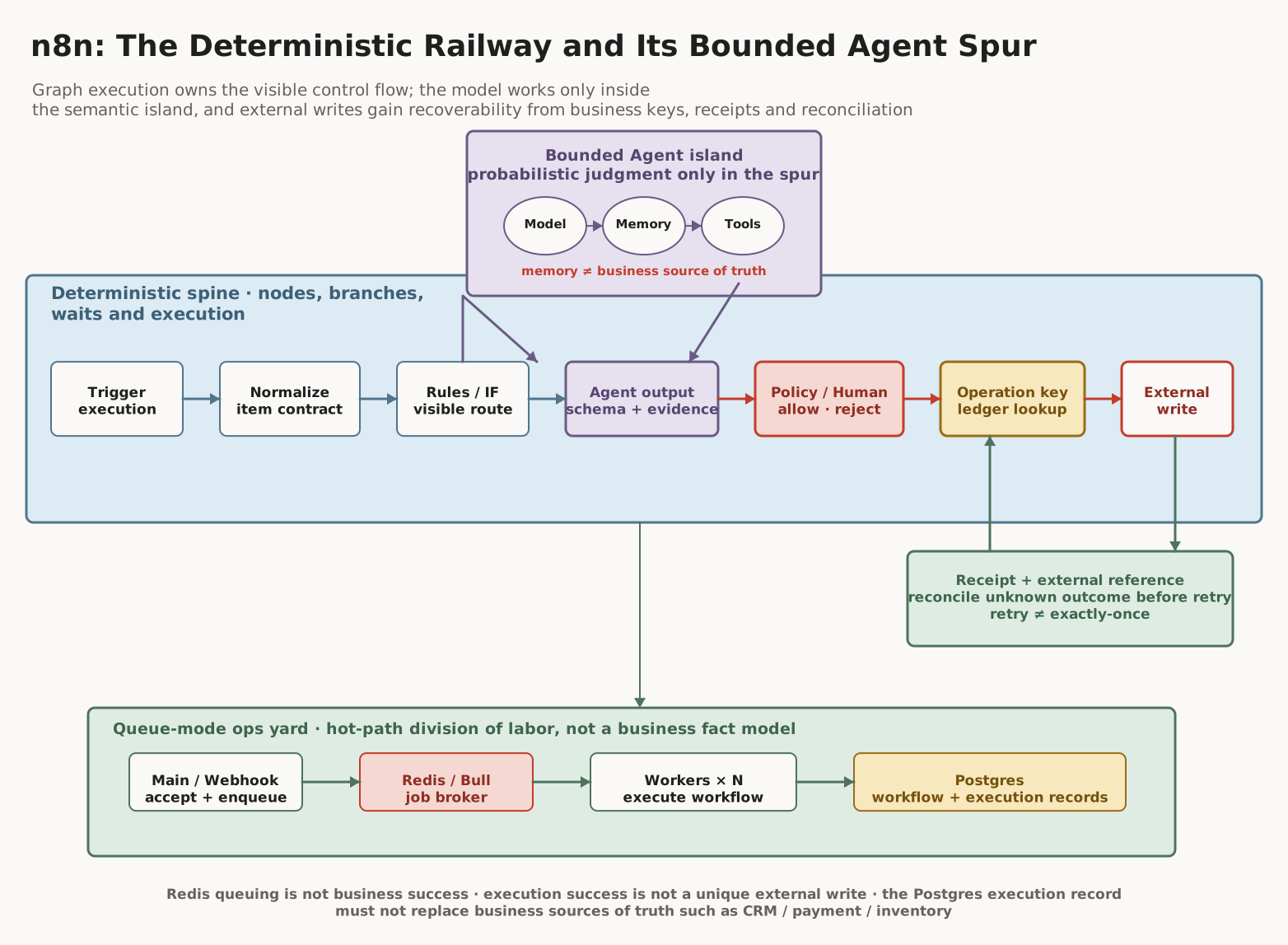
Diagram: the Railway Spine, the Agent Spur and the Ops Yard

Reading guide: The blue spine runs from trigger, item normalization and explicit rules into the Agent output, then through the policy/human gate and operation-key lookup before any external write is triggered. The purple Agent island handles only the local parts that need semantic judgment; memory is not the business source of truth. The green loop writes external references into the ledger and queries for reconciliation first when the outcome is unknown. The yard at the bottom shows queue mode: the main/webhook process receives and enqueues, Redis/Bull schedules, workers execute, and Postgres stores workflow and execution records. It is a throughput and recovery plane, not the data model for orders, payments or inventory.
How the Graph Owns Macro Control Flow
WorkflowExecute builds the nodeExecutionStack from workflow connections, start/destination and branch order, schedules nodes and saves run data, source and execution index; it also handles waiting, cancel, error and partial execution. workflow-execute.ts
Since n8n 1.0, multiple branches execute by default in canvas order rather than letting the model decide which one goes first. Execution order
The minimal hand-off unit between nodes is the item array:
[
  {
    "json": {},
    "binary": {}
  }
]
INodeExecutionData in the source can also carry error, pairedItem, metadata, evaluationData and redaction information. pairedItem keeps the lineage between output and input, so downstream expressions know which upstream item a result came from. Data structure
This item contract is the key that lets an Agent island return to an ordinary workflow. Downstream IF, Set, Database or HTTP nodes do not need to understand a LangChain scratchpad; they just consume normal { json, pairedItem }.
The Agent Node Does Not Just Open a LangChain Loop Anywhere in the Graph
The default AI Agent version in 2.33.6 is 3.1, unified into Tools Agent V3. For each input item it:
- reads the prompt and system message;
- connects a chat model with an optional fallback model;
- loads optional memory;
- collects tools and the output parser;
- rebuilds agent steps from earlier EngineResponses;
- creates a tool-calling agent;
- if the model returns final values, formats them as normal n8n items;
- if the model returns tool calls, generates an EngineRequest.
The most critical boundary is not “it uses LangChain”, but EngineRequest / EngineResponse:
Agent node
  model chooses tool + arguments
        │
        ▼
EngineRequest
  actionType: ExecutionNodeAction
  nodeName / input / id / metadata
        │
        ▼
Workflow execution engine
  schedules real tool node
  applies credential / HITL / logs / lineage
        │
        ▼
EngineResponse
  action + ITaskData
        │
        └────────► resume Agent node
These types are defined in interfaces.ts
, and the logic that pauses the Agent, pushes tool nodes onto the execution stack, waits for actions to finish and resumes the Agent lives in requests-response.ts
.
This design lets two kinds of ownership hold at the same time:
- the model owns the probabilistic choice of “which tool to call now”;
- the n8n engine owns the execution control of “which node, which credential, how to log and how to resume”.
If the Agent executed all tools internally, real side effects would leave the shared governance of graph run data, HITL, credentials and lineage.
The Agent Island’s Boundary Table
| Capability | What the Agent node owns | What it cannot pretend to own |
|---|---|---|
| Input | prompt mapping of the current item | the full business facts |
| Context | system, input, chat history, prior tool steps | the history of every workflow node |
| Model | tool call or final answer | the graph’s next node |
| Memory | optional chat history load/save | the execution database, CRM state |
| Tools | tool definitions visible to the model | executing side effects while bypassing the engine |
| Output parser | structure parsing and format constraints | factual correctness |
| Stop | final, max iterations, cancel, error, denial | completion of the overall business task |
| Eval | checkable by a separate evaluation workflow | a default quality gate on every production run |
V3 defaults maxIterations to 10; reaching the limit throws NodeOperationError. This is not model self-discipline but the workflow setting a budget for the probabilistic loop. checkMaxIterations.ts
The official node description mentions an action plan, but what the source proves is a tool-calling loop with no independent, persisted plan state. One must not draw a Planner Service that does not exist.
There is another batch boundary that is easy to trip over: root nodes usually resolve expressions per item, while AI cluster sub-node expressions may resolve only the first item. With batch input, you cannot assume that model/memory/tool sub-nodes automatically share the exact $json semantics of the root Agent.
The Real Data Path of Queue Mode
The official docs say queue mode offers the best scalability. Its main path is not “Redis receives the whole workflow and executes it”, but:
main / webhook processor
  1. create execution and executionId
  2. enqueue the job into Redis/Bull
        │
        ▼
worker
  3. dequeue executionId
  4. load workflow + execution data from the database
  5. execute the graph
  6. write status and results back to the database
  7. notify main via Bull progress / pubsub
The queue mode docs make the responsibilities explicit:
- main: API, editor and timer, also receiving webhooks by default;
- webhook processors: optional, scaling only webhook ingress;
- Redis: message broker and pending execution queue;
- workers: actually executing production workflows;
- database: persistence for workflow and execution data;
- shared encryption key: letting every process read the same credentials.
In the 2.33.6 source:
- Bull is version 4.16.4;
- ioredis is 5.3.2;
- job data mainly carries
workflowId,executionIdandloadStaticData; - workers rehydrate from the database by execution ID;
- finished, failed, webhook response and streaming chunks flow back through Bull progress;
- completed jobs can be deleted from Redis, and main even stashes details in an in-memory
jobResults.
All of these behaviors say: a Redis job is not long-term execution history. scaling.service.ts
Postgres’s role must not be overstated either. It can be the durable source of truth for n8n workflow definitions, execution state and results, but it does not automatically become the business source of truth for CRM, payment, inventory or email delivery.
An execution row marked success only proves the worker finished the path it could observe.
The Webhook Processor Splits Only the Ingress, Not Business Semantics
Under high webhook traffic you can route /webhook/* and /webhook-waiting/* to a webhook processor pool and keep /webhook-test/*, internal APIs and the UI on main. The official advice is not to make main also carry the production webhook pool, so the editor does not slow down.
But the webhook processor only receives and hands off executions; the real graph still runs on workers.
A synchronous webhook adds another easy-to-overlook chain:
client HTTP connection
  ↔ main / webhook processor
       ↔ Redis progress
            ↔ worker result
Even if the worker has already finished the external action, a Redis/Bull channel failure can still keep the entry point from getting a timely response. The client then sees a timeout, which does not mean the work did not happen.
This is another reason the operation key must be defined at the business layer.
Wait Is a Durable Pause, Not a Transaction Freeze
When a Wait node faces a long wait, it offloads execution data to the database; at the specified time or date, or when a unique resume webhook / form submission arrives, it reloads and continues. Wait
Waits shorter than 65 seconds are the exception: the execution is not offloaded, and the original process waits on a timer.
What Wait solves is resource occupancy and the resume position:
before Wait nodes
  → persist state + waitTill
  → release worker/process
  → resume signal
  → reload state
  → continue after Wait
It does not freeze the outside world. Emails sent before entering Wait will not pause, orders already created do not enter a database transaction because the execution is waiting, and whether duplicate resume webhook requests get strong deduplication was not guaranteed in the material reviewed this round.
Keeping waiting executions out of pruning is reasonable lifecycle protection; it is still not a durable business transaction.
Retry, Error Workflow and Recovery Are Three Different Things
Retry: Try Again
A failed execution can be:
- retried with the currently saved workflow;
- retried with the original workflow;
- retried using the last execution data as input.
retryOf / restartExecutionId in the source shows that a retry is a related new execution path, not a transparent continuation of the original execution. All executions
Error Workflow: Start Another Flow After Failure
An Error Workflow must start from an Error Trigger and can send notifications, create incidents, save diagnostics or orchestrate human compensation. It is not a database rollback and does not automatically run the original graph backwards.
Queue / Execution Recovery: Converge the Internal Records
The leader in 2.33.6 periodically:
- reads
new / runningexecution IDs from the database; - compares them against Redis
active / waitingjobs; - marks executions that exist in the database but not in Redis as
crashed.
It does not re-run them automatically. This choice looks conservative, but it avoids the background silently executing again when unknown external side effects may already have happened.
The other execution recovery path can patch status, stoppedAt and partial node run data from event logs; with no logs it marks crashed. The source also admits that worker-side lifecycle logs may be incomplete, so this is best-effort reconstruction, not strict event sourcing. execution-recovery.service.ts
JobProcessor even handles one race explicitly: Bull’s implicit retry can re-enqueue an execution that n8n recovery has already marked crashed; the processor sees status === crashed, refuses to actually execute, and leaves a source comment saying that the two mechanisms need to be redesigned. job-processor.ts
That is a strong architectural signal:
The first goal of n8n recovery is to converge internal state into an explainable failure, not to automatically manufacture success out of every dangling task.
Why Exactly-Once Does Not Live in the Queue
End-to-end exactly-once spans at least four systems:
Postgres execution row
Redis/Bull job
worker process
external API state
Between the external write and the DB completion there is no public distributed transaction:
t0 worker sends POST /payments
t1 payment provider commits
t2 worker dies
t3 n8n marks execution crashed
t4 operator clicks retry
t5 POST /payments happens again
Redis persistence, replication or the Bull lease can reduce job loss, but cannot tell n8n whether the payment provider committed at t1. The execution log can only record what n8n saw.
The so-called “at-most-once tasks” in the multi-main docs refer only to control-plane tasks owned by the leader, such as timers, pollers, persistent connections and pruning; they cannot be generalized into the side-effect semantics of all workflow executions.
The only safe statement is:
- n8n provides execution identity;
- the database provides the execution record;
- Redis provides scheduling;
- recovery detects internal loss of contact;
- the business author provides idempotency keys, receipts, queries and compensation.
Rather than reading the t0–t5 above as a story, change the crash point and the recovery action yourself and see how many times the same external write really happens:
After the worker crashes, what can the local record actually prove — and how many external writes does each recovery action cause?
Scenario: Plain HTTP write · Crash point: After external commit, before the receipt lands · Recovery action: Direct retry
- Start the operation(Worker process) Crash point
- Record intent (reserved)(Local record) Crash point
- Send the request(Worker process) Crash point
- External side effect commits(External service) ×2 Crash point
- Receive the receipt(Worker process) Crash point
- Record the receipt locally(Local record) Crash point
- Return the result(Worker process) Crash point
- Actual external actions
- 2
- Local knowledge
- Unknown (exactly-once unprovable)
- Next safe action
- Manual reconciliation or compensation
The external write happened more than once: reconcile and compensate the duplicate.
View the full outcome table
Scenario Crash point Recovery action Actions Knowledge Next Plain HTTP write Before the send Direct retry 1 Confirmed success (exactly once) Record and return the receipt — do not send again Plain HTTP write Before the send Query the receipt 0 Confirmed failure (provably nothing, or provably more than once) Safe to retry Plain HTTP write Before the send Resend with a stable idempotency key 1 Confirmed success (exactly once) Record and return the receipt — do not send again Plain HTTP write After external commit, before the receipt lands Direct retry 2 Unknown (exactly-once unprovable) Manual reconciliation or compensation Plain HTTP write After external commit, before the receipt lands Query the receipt 1 Unknown (exactly-once unprovable) Manual reconciliation or compensation Plain HTTP write After external commit, before the receipt lands Resend with a stable idempotency key 2 Unknown (exactly-once unprovable) Manual reconciliation or compensation Plain HTTP write After the receipt is recorded Direct retry 2 Confirmed failure (provably nothing, or provably more than once) Manual reconciliation or compensation Plain HTTP write After the receipt is recorded Query the receipt 1 Confirmed success (exactly once) Record and return the receipt — do not send again Plain HTTP write After the receipt is recorded Resend with a stable idempotency key 2 Confirmed failure (provably nothing, or provably more than once) Manual reconciliation or compensation Provider supports idempotency keys Before the send Direct retry 1 Confirmed success (exactly once) Record and return the receipt — do not send again Provider supports idempotency keys Before the send Query the receipt 0 Confirmed failure (provably nothing, or provably more than once) Safe to retry Provider supports idempotency keys Before the send Resend with a stable idempotency key 1 Confirmed success (exactly once) Record and return the receipt — do not send again Provider supports idempotency keys After external commit, before the receipt lands Direct retry 2 Unknown (exactly-once unprovable) Manual reconciliation or compensation Provider supports idempotency keys After external commit, before the receipt lands Query the receipt 1 Unknown (exactly-once unprovable) Manual reconciliation or compensation Provider supports idempotency keys After external commit, before the receipt lands Resend with a stable idempotency key 1 Confirmed success (exactly once) Record and return the receipt — do not send again Provider supports idempotency keys After the receipt is recorded Direct retry 2 Confirmed failure (provably nothing, or provably more than once) Manual reconciliation or compensation Provider supports idempotency keys After the receipt is recorded Query the receipt 1 Confirmed success (exactly once) Record and return the receipt — do not send again Provider supports idempotency keys After the receipt is recorded Resend with a stable idempotency key 1 Confirmed success (exactly once) Record and return the receipt — do not send again System supports receipt queries Before the send Direct retry 1 Confirmed success (exactly once) Record and return the receipt — do not send again System supports receipt queries Before the send Query the receipt 0 Confirmed failure (provably nothing, or provably more than once) Safe to retry System supports receipt queries Before the send Resend with a stable idempotency key 1 Confirmed success (exactly once) Record and return the receipt — do not send again System supports receipt queries After external commit, before the receipt lands Direct retry 2 Unknown (exactly-once unprovable) Manual reconciliation or compensation System supports receipt queries After external commit, before the receipt lands Query the receipt 1 Confirmed success (exactly once) Record and return the receipt — do not send again System supports receipt queries After external commit, before the receipt lands Resend with a stable idempotency key 2 Unknown (exactly-once unprovable) Manual reconciliation or compensation System supports receipt queries After the receipt is recorded Direct retry 2 Confirmed failure (provably nothing, or provably more than once) Manual reconciliation or compensation System supports receipt queries After the receipt is recorded Query the receipt 1 Confirmed success (exactly once) Record and return the receipt — do not send again System supports receipt queries After the receipt is recorded Resend with a stable idempotency key 2 Confirmed failure (provably nothing, or provably more than once) Manual reconciliation or compensation
Observe: which crash window loses the evidence? Which recovery action converges the unknown to exactly once?
Watch the gap between the readings: actual external action count is the fact in this teaching scenario, while local knowledge is all the execution record can really prove. In the “externally committed, receipt not yet landed” window, retrying directly turns one write into two while local knowledge can still only say unknown — folding that into failure is what produces duplicated side effects. A supported receipt query and a server-side idempotency key both converge the unknown into exactly once; when no query is supported, the only safe next step is manual reconciliation.
How the Operation Ledger Adds Business Semantics
Generate a stable business key before any external write:
operation_key =
  workflow_business_action
  + target
  + business_entity_id
  + semantic_version
A minimal operation ledger can record:
{
  "operation_key": "invoice:create:customer-42:v3",
  "execution_id": "n8n-execution-id",
  "request_hash": "sha256:...",
  "target": "billing-provider",
  "status": "reserved",
  "external_reference": null,
  "attempts": 1,
  "last_checked_at": null
}
The write flow:
- query the operation key;
- if a
confirmedentry exists, return the old external reference; - otherwise reserve it first;
- when the target API supports an idempotency key, send the same key;
- issue the write;
- save the response and external reference;
- when the local outcome is unknown, query the target system by key/reference first;
- only retry after confirming “it did not happen”;
- when no query is possible, fall back to manual reconciliation.
The key here is not one more table; it is admitting three states:
confirmed success
confirmed failure
unknown
Folding unknown directly into failure is what produces duplicated side effects.
Why Agent Memory Cannot Be the Business Ledger
The public role of Agent memory is optional chat history:
- load before the Agent runs;
- save after the final output;
- provide context for later language interaction.
It does not own:
- the operation key uniqueness constraint;
- the payment provider receipt;
- the inventory version;
- the current CRM record;
- execution lineage;
- concurrent transactions.
A model can “remember that it seems an email was sent” from memory; that is not auditable duplicate-prevention evidence.
The correct layering is:
| State | Owner |
|---|---|
| Agent chat history | memory sub-node / memory backend |
| current item | workflow execution |
| node input/output | execution record |
| job dispatch | Redis/Bull |
| workflow/execution persistence | Postgres |
| binary object | DB / S3 |
| business facts | CRM / payment / inventory / operation ledger |
Pruning and Binary Data Are Correctness Boundaries Too
Execution pruning is on by default. Completed executions can be soft-deleted by age or count, then permanently deleted after a hard-delete buffer of about 1 hour by default; new, running, waiting and annotated executions do not enter pruning. Execution data
This means execution history is an operational record and should not carry a long-term audit ledger without extra design.
Binary data lives in memory by default, and large files can crush the process. Queue mode also cannot use local filesystem binary storage, because the workers consuming jobs, main and webhook processors do not share one machine’s file paths; 2.33.6 should use database or S3 external storage. Binary data
If you have switched binary storage modes, the pruner only cleans the current active mode and old backend objects may linger. After the storage location changes, lifecycle, deletion and data residency duties still need checking by the operator.
The Real Boundary with Temporal
There is no need for another tool alternatives chart. Looking only at correctness semantics:
Where n8n Excels
- connector-dense work;
- business operators can read the canvas;
- node configuration changes frequently;
- human approval and debugging matter;
- external errors can be handled with retry, compensation and humans;
- SaaS integration is the main job.
Where a Durable Execution Engine Excels
- flows must continue across process failures, deployments and long waits;
- workflow code needs deterministic replay;
- activity retry, timers, signals and versioning are core semantics;
- state recovery is business correctness, not operational convenience.
Temporal will not automatically make external Activities idempotent either; its docs likewise require Activities to be as idempotent as possible. Temporal Activities
A reasonable combination can be:
n8n
  trigger + SaaS ingress + human approval + visible operations
        │
        ▼
durable engine
  long-lived core business process
        │
        ▼
n8n
  notification + exception inbox + operator actions
What queue mode scales is throughput, not correctness promises.
The Enterprise Control Plane Still Has Seams
n8n’s enterprise governance provides:
- instance / project RBAC;
- project roles such as Admin / Editor / Viewer;
- source-control environments and PRs;
- a protected production instance;
- security audit;
- log streaming;
- community/custom node management;
- credential and encryption-key operations.
These abilities make workflows reviewable configuration artifacts, but cannot version external system state. Having workflows, tags, variables and credential stubs in Git does not mean secret values, database rows and third-party side effects are atomically consistent with that commit.
Variables and tags are again instance-global and do not fall entirely inside project RBAC boundaries. Community/custom nodes are an executable supply chain; the richer the connectors, the greater the duty of reviewing host permissions and credential access.
A visible product control plane does not mean every data plane is governed uniformly.
A Pre-Launch Responsibility Table
| Question | Who must answer it |
|---|---|
| which branches may be model-selected | workflow author |
| the Agent’s max iterations and output schema | Agent/workflow author |
| which tools must be approved | policy owner |
| which parameters and evidence approvers see | product owner |
| how the operation key is generated | integration developer |
| whether the target API supports idempotency | target system owner |
| how an unknown outcome is queried | integration developer |
| how to compensate when no query exists | business operator |
| how Redis/Postgres/S3 are backed up | platform operator |
| how long executions and binaries are retained | compliance / platform owner |
| which nodes and credentials may enter production | instance administrator |
The Agent will not take over these duties. It will only let forgotten duties run faster.
Boundary Checklist
Confirmed
WorkflowExecuteowns the graph node stack, branches, run data and lifecycle;- Agent V3 separates tool selection from tool execution with EngineRequest/EngineResponse;
- Agent output returns to the normal item contract and keeps pairedItem;
- in queue mode Redis/Bull schedules, workers execute, the database persists;
- Wait can offload long-wait state to the database;
- retry is a related new execution, and an Error Workflow is another workflow;
- queue recovery compares DB/Redis and marks crashed without auto re-running;
- queue mode has no public exactly-once external side-effect guarantee.
Design Inferences
- n8n fits as a visible, approvable workflow-controlled spine;
- the Agent should be a local island with schema, budget and exit points;
- marking crashed on recovery is the more conservative choice when facing unknown side effects;
- only an operation ledger and reconciliation connect execution identity to business facts.
Still Unknown
- a unified RPO/RTO for Redis deployments;
- whether every path has stronger atomicity between the DB row and the enqueue;
- strong deduplication semantics for the Wait resume webhook;
- all Error Workflow failure boundaries;
- the completeness of event-log recovery under various worker crashes;
- undisclosed n8n Cloud infrastructure;
- the idempotency and compensation ability of every third-party node.

Responses